
Problems during a stay
On this page
Most problems during a stay start with a message to your guest, and on RoveTravel.com reservations our team can step in too. This guide walks you through rule breaks, lockouts, complaints and refund requests, ending a stay early, neighbor complaints and emergencies. If we manage your property on Rove+ or Rove Lite, your plan agreement sets who handles what: email support@andora.ai about any problem, and include the property, the guest's name and the dates.
Part 1: Deal with a party, extra guests or a rule break
Guests who book on RoveTravel.com agree to follow your House Rules and the building's rules, to stay within your guest limit and not to hold a party you haven't allowed. That's section 7 of the Rove Travel Terms of Service.
If guests are breaking the rules:
- If anyone is in danger, call 911 or your local emergency services first.
- Message the guest in Messages. Say which rule they're breaking and what you need them to do. If you see You have view-only access and can't send messages., your role lets you read conversations but not reply; ask an Admin on your team to change it (see the Your team and account guide).
- Tell us straight away if it's a RoveTravel.com reservation. Tag @Rove Concierge in the conversation (see below), or email us with the property, the guest's name, the dates and what's happening.
- Keep photos, videos, messages and any noise-monitor readings. You'll need them to charge the guest for damage or extra cleaning (see "How do I make a damage claim?" in the FAQ).
On an Airbnb or Vrbo reservation, report it to that site too.
You set your guest limit as the maximum number of guests in Space & Capacity, and whether you allow parties with Allow events in House Rules (see the Editing your listing guide).
Alert our team from a conversation
On a RoveTravel.com reservation, you can bring our team into the conversation with your guest. Rove Concierge isn't offered in conversations from Airbnb, Vrbo or other sites; email us instead.
- Open the guest's conversation in Messages. If you see a choice between Guest Chat and Internal Chat, select Guest Chat. An internal note doesn't alert us.
- Type @ and select Rove Concierge. You'll see Rove Concierge will be notified when you send this.
- Say what's happening, then send the message. Your guest sees everything you write, so keep it factual.
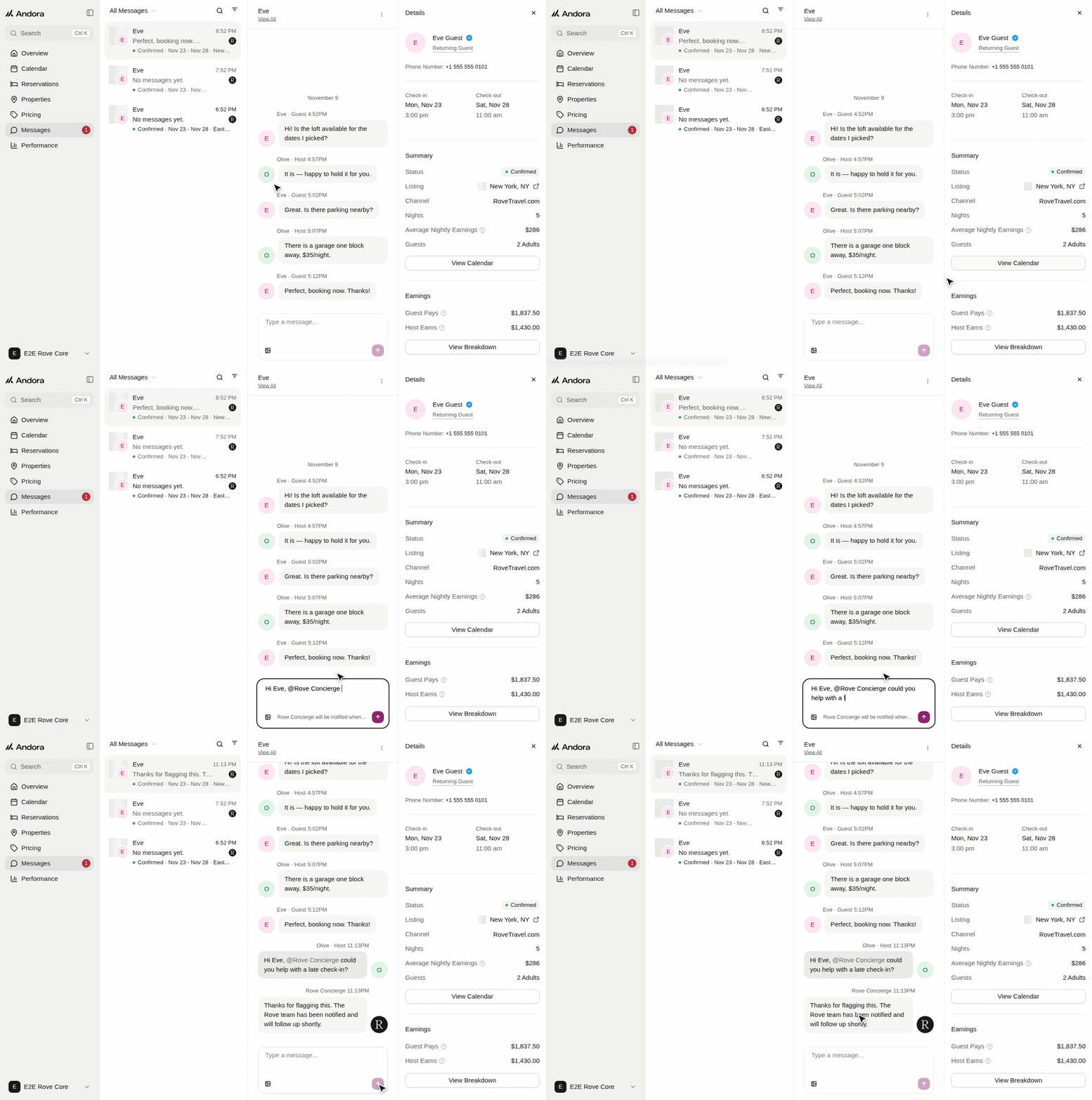
Our team is alerted, and a message confirming it appears in the conversation.
Can I use cameras or noise monitors?
Indoor cameras aren't allowed. Outdoor cameras, and noise monitors that don't record audio, are allowed only where the law permits them and your listing discloses them (section 7.1 of the Rove Travel Host Terms).
If you're not sure how to show yours on your listing, email us with the property and the devices you have.
Part 2: Help a guest who's locked out
On Rove Core, you look after the keys, locks and door codes, so you're the first to help. Keep your phone on around arrival times.
- Call or message the guest and find out what isn't working. Once a reservation is confirmed, Details beside the conversation in Messages shows the guest's phone number, if we have it. If your guest didn't get the door code, see the FAQ.
- Get them in another way: a spare key, a lockbox or someone nearby who can let them in.
- If you can't get them in quickly on a RoveTravel.com reservation, tag @Rove Concierge or email us, and say what you've tried.
Each property must have working locks at check-in. If a RoveTravel.com guest can't get in, we may refund, credit or rebook them. Costs that come from something within your control can be taken from your payouts (sections 2.3 and 5 of the Rove Travel Host Terms).
Part 3: Handle a complaint or refund request
Fix what you can straight away. On RoveTravel.com reservations, we decide any refund.
- Reply in Messages quickly and ask for photos or a video.
- Send your cleaner or a repair person, and tell the guest when they'll arrive. Agree on a time before anyone goes in: you can enter during a stay only as your rental agreement and the law allow.
- Tell us what happened and what you did, with photos or receipts. Tag @Rove Concierge or email us.
- Don't promise, pay or arrange a refund yourself. Payments and refunds for RoveTravel.com reservations go through RoveTravel.com.
Who pays for a refund?
If a property is materially different from its listing or unsafe, or a guest can't get in, we may refund, credit or rebook the guest, or end the reservation. When the cause is your property, your listing or anything else within your control, the refund and costs such as rebooking can be taken from your payouts. That's section 5 of the Rove Travel Host Terms.
To ask us to review a refund decision, email us with any new evidence.
On an Airbnb or Vrbo reservation, that site's own refund process applies.
Part 4: Contact us before you end a stay early
Ending a stay early is a serious step, and it must follow the law where your property is.
Section 7.2 of the Rove Travel Terms of Service covers this. If a guest's party seriously or repeatedly breaks the rules, we or you may end the stay, as the law allows, without refunding unused nights.
- If anyone is in danger, call 911 or your local emergency services first.
- Keep a record: photos, videos, messages and anything neighbors or the building have told you.
- Email us straight away, or tag @Rove Concierge, and say what's happening.
- Wait for our team before you ask the guest to leave. Don't change the locks or remove a guest's belongings.
Every stay of 30 nights or more is under a lease. Where the law treats the guest as a tenant, tenancy law decides how the stay can end, so get legal advice before you act.
What if a guest stays past check-out?
If a guest stays past check-out without your agreement, tell us. They may owe for the extra time (see "How do I make a damage claim?" in the FAQ).
Part 5: Respond to a complaint from a neighbor or your building
Treat it like a rule break: get the details, talk to your guest and keep us in the loop.
- Ask the neighbor or building what happened and when, and for any photos, videos or recordings.
- Message the guest in Messages. Name the rule involved, such as quiet hours or the guest limit, and what you need them to do.
- Email us the complaint and the evidence if it's a RoveTravel.com reservation.
- Add the building's rules to your House Rules, so future guests agree to them when they book (see below).
RoveTravel.com guests are responsible for fines their party causes. To charge one to a guest, see "How do I make a damage claim?" in the FAQ. Your building's, HOA's or landlord's limits on renting are your responsibility (see "Can I rent out my property for short stays?" in the FAQ).
Add quiet hours and building rules
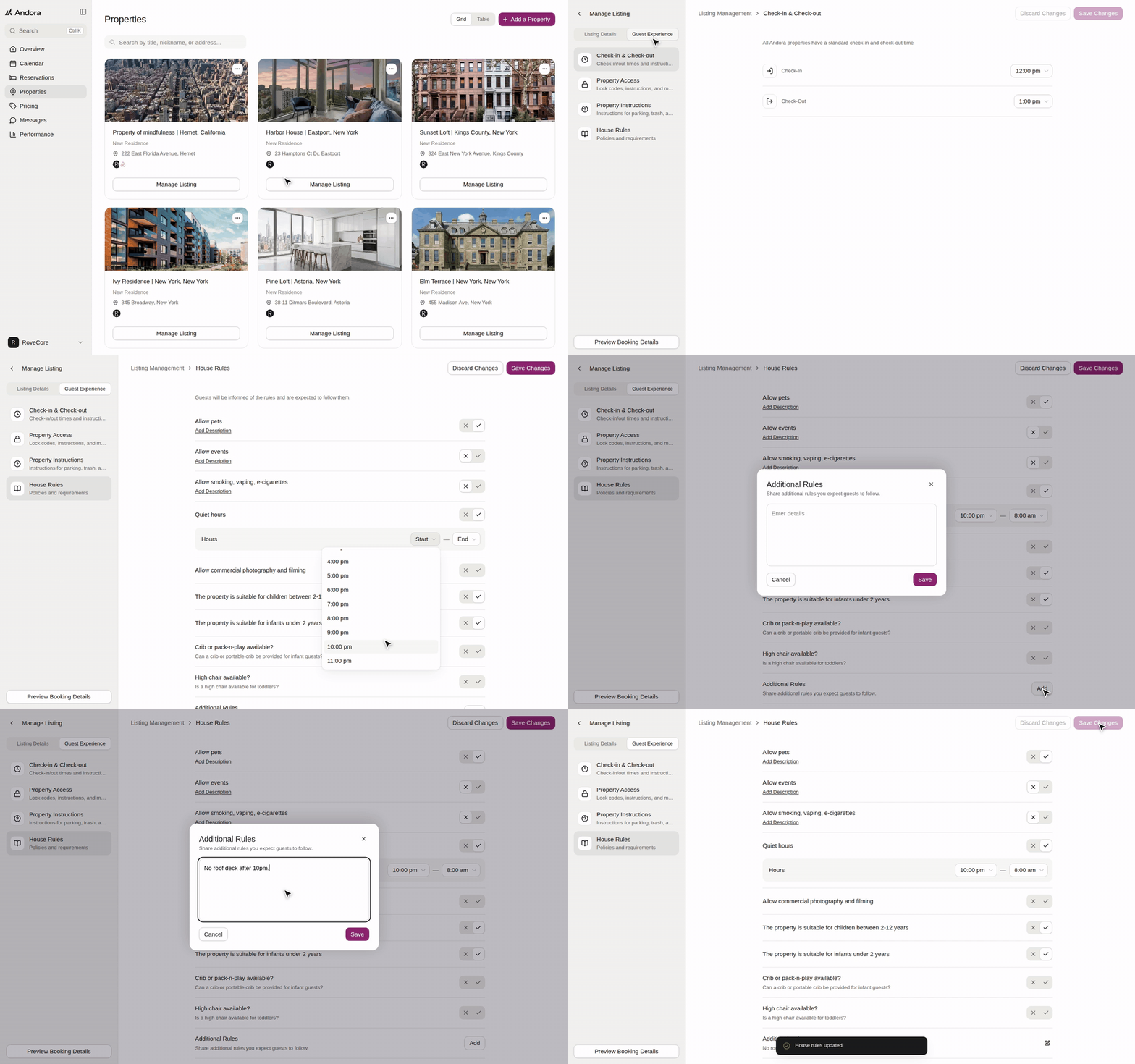
- Open Properties and select Manage Listing for the property.
- Select Guest Experience, then House Rules.
- Select the check mark beside Quiet hours, then select the start and end times.
- Select Add beside Additional Rules, or the edit icon if you've already written some.
- Enter the building's rules, then select Save.
- Select Save Changes. You'll see House rules updated. If you don't see Save Changes, your role may not allow it; ask an Admin on your team to change it (see the Your team and account guide).
If guests need the building's approval before they arrive, turn on Condo board or HOA application required? in Legal & Compliance on the Listing Details tab. Then add the details (see the Editing your listing guide).
Part 6: Get help in an emergency
Call 911, or your local emergency services, first whenever anyone is in danger. Then tell us as soon as it's safe.
- Call 911 for a fire, an injury, flooding, a gas leak, an electrical hazard or a break-in.
- Check on your guests and tell them what's happening, by phone or in Messages.
- Tell us. On a RoveTravel.com reservation, tag @Rove Concierge in the conversation. Also email us with the property, the dates and what happened.
- Tell your own insurer about anything that could lead to an injury or damage claim (see "Do I need my own insurance?" in the FAQ).
If the property can't be used for the rest of the stay, see "What if a storm or emergency stops a stay?" in the FAQ for what happens to the reservation.